![sudo[freedom].org](https://sudofreedom.org/content/images/2025/08/sudo.png)
Windows 10's End of Life: Microsoft's Latest Shakedown
![sudo[freedom]](/content/images/size/w160/2025/08/square.svg)

On October 14, 2025, Microsoft officially ended support for Windows 10. For the roughly 40% of Windows users still running it, this means no more security updates, no more patches, and no more protection against new threats. Your computer didn't suddenly stop working. It's just that Microsoft decided to stop supporting it.
But here's what makes this different from normal software lifecycles: Microsoft isn't giving you real choices. They're forcing you into a corner where every option benefits them, costs you money, invades your privacy, or all three at once.
The Monopoly Nobody Talks About
Let's be clear about why Windows has 70% of the desktop market share. It's not because people carefully evaluated their options and chose Windows. It's because of decades of OEM deals with manufacturers.
When you buy a Dell, HP, Lenovo, or almost any other major brand computer, Windows comes pre-installed. You paid for it whether you wanted it or not. It's baked into the price. Most people never even consider that alternatives exist because Windows is simply "what comes with the computer."
Developers follow the users, so professional software gets built for Windows first. Which means more users stay on Windows. The cycle perpetuates itself. It's not about quality. It's about market dominance through strategic partnerships and installed base.
People chose Windows out of convenience, not conviction. And now Microsoft is exploiting that captured audience.
The Long Decline From Windows XP
Windows XP was the last truly great product Microsoft made. Released in 2001, it was stable, fast, and did what an operating system should do: stay out of your way and let you work. It didn't spy on you. It didn't serve you ads. It didn't constantly nag you about cloud services you don't want.
Windows 7 came in as a distant second. It was acceptable. Functional. An improvement over the Vista disaster.
Windows 10 marked the beginning of something darker. Microsoft shifted from selling you software to selling you as a product. Telemetry became standard. Privacy became optional. Your operating system started watching everything you did.
Windows 11 is where the mask came off completely.
Windows 10: The Telemetry Nightmare Begins
Windows 10 introduced something Windows users had never dealt with before: constant surveillance built into the operating system itself.
Every time you opened an app, typed a search query, or clicked a link, Windows 10 was logging it. Diagnostic data. Usage patterns. Error reports. All sent back to Microsoft's servers. Even with telemetry settings turned to "Basic," your computer was constantly phoning home.
Users complained. Privacy advocates raised alarms. Microsoft promised improvements but never actually stopped the data collection. They just made it slightly less visible and gave you the illusion of control through settings that didn't actually disable much.
The problem wasn't just that Microsoft was collecting data. It was that you couldn't verify what they were collecting, you couldn't stop it completely, and you had no way to audit what Windows was actually doing because the source code is closed.
The Perfect Target for Hackers
Windows 10's massive user base makes it the single most valuable target for cybercriminals on the planet. Combine that with these facts:
- Zero-day vulnerabilities are constantly discovered. Windows has so much legacy code and complexity that new security holes appear regularly.
- Most Windows users have no idea how to protect themselves. They click suspicious links, download random files, and ignore security warnings because they've been trained to click "OK" on everything.
- After October 14, 2025, Windows 10 gets no more security patches. Every vulnerability discovered from that point forward stays open. Forever.
If you keep using Windows 10 after its end of life and connect to the internet, you will get infected. It's not a matter of if, but when. And when your computer becomes part of a botnet, you won't just be a victim. You'll be attacking others, sending spam, and spreading malware to everyone you interact with online.
This is Microsoft's doing. They're abandoning 40% of their user base and leaving hundreds of millions of computers vulnerable.
Forced Obsolescence: The TPM 2.0 Scam
Microsoft says Windows 11 requires TPM 2.0 (Trusted Platform Module) for security. Specifically, for Windows Hello and BitLocker encryption.
Here's the problem: those are features, not core components of the operating system.
If TPM 2.0 is truly necessary for Windows Hello and BitLocker, then fine. Don't enable those features on unsupported hardware. But the rest of Windows 11 should still work. Just like how Steam runs on your computer even if you don't have a VR headset. The games that require VR don't work, but everything else does.
Except Windows 11 actually does run on unsupported hardware. There are countless examples of people bypassing the restrictions and running Windows 11 on older machines without TPM 2.0. As a side note, Bitlocker runs just fine on a Windows 10 system with TPM 1.2 or higher. BitLocker can also be enabled on a Windows 10 system without any TPM (or with a version that isn't supported) by modifying a Group Policy settings. You must enable the policy setting "Require additional authentication at startup" and check the box for "Allow BitLocker without a compatible TPM." In this configuration, BitLocker requires an alternative authentication method at startup, such as a password or a Startup Key on a USB flash drive, instead of the automatic protection provided by a compatible TPM. Its a hassle, but possible.
The operating system works fine. Microsoft is lying about the requirements being necessary.
So why enforce them?
E-waste. Planned obsolescence. Forcing hardware upgrades.
Microsoft wants you to buy a new computer, they get paid with every OEM install. PC manufacturers want you to buy a new computer, They get paid with every new PC manufactured by low paid workers in Asia. So they created an artificial requirement that makes perfectly functional machines "obsolete."
Your 5-year-old computer with an Intel i7 processor, 16GB of RAM, and a solid-state drive works perfectly fine. It can run Linux without any issues. It can run Windows 11 if you bypass the checks. But Microsoft says it's too old and you need to throw it away.
This creates:
- Massive e-waste from computers that still work
- Unnecessary expense for individuals and businesses
- Environmental damage from manufacturing millions of new computers that weren't needed
All so Microsoft can push people to Windows 11.
Your "Options" with Microsoft are All Bad
Microsoft is offering Windows 10 users extended security updates through their ESU program. Here are your choices:
Option 1: Pay Microsoft $30 per device for one year of updates. After that year, you're right back where you started.
Option 2: Spend 1,000 Microsoft Rewards points. Earn those by filling out surveys (giving Microsoft more data) or buying games from their store.
Option 3: Sync your PC settings to OneDrive. Give Microsoft access to your files and settings, and accept their cloud service you don't want or need. You'll also need to create a Microsoft account if you don't have one, which means more tracking and data collection.
Option 4: Upgrade to Windows 11. Even if your computer doesn't meet the requirements, you can bypass the checks with registry tweaks or modified install media. But then you're constantly worried that the next Windows Update will detect the workaround and brick your system.
Option 5: Buy a new computer and run Windows 11.
Notice a pattern? Every option benefits Microsoft financially or gives them more data about you. None of them respect your hardware, your privacy, or your right to keep using a computer you already own.
Windows 11: Spyware Disguised as an Operating System
In February 2023, The PC Security Channel ran an experiment. They took a brand-new Windows 11 laptop, booted it up for the first time, and monitored what data it sent online using Wireshark network analysis tools.
The results were shocking.
Even before connecting to websites, opening any apps, or doing anything at all, Windows 11 was already sending data to dozens of servers. Not just Microsoft servers, but third-party advertising networks, marketing companies, and analytics platforms.
Here are some of the connections detected:
- steamcloud-london.storage.googleapis.com
- geo.prod.do.dsp.mp.microsoft.com
- tunnel.cfw.trustedsource.org (McAfee)
- sb.scorecardresearch.com (web browsing data collector)
This was with telemetry settings at the absolute minimum. Baseline Windows 11 activity involves constant surveillance, even when you're not doing anything.
For comparison, they ran the same test on Windows XP. The difference was stark. Windows XP made exactly one connection: to Microsoft's download servers to check for OS updates. That's it. No Bing. No MSN. No advertising networks. No third-party tracking.
Windows 11 also requires a Microsoft account to install and use. You can bypass this requirement, but the vast majority of users won't know how. That Microsoft account automatically enables cloud syncing, telemetry, and data collection across all your devices.
On top of that, Windows 11 comes with:
- Ads in the Start menu (for a product you paid for)
- Forced Copilot AI integration you didn't ask for
- Constant promotion of Microsoft 365, OneDrive, and other Microsoft services
- Broken updates that regularly cause blue screens, data loss, and system instability
Windows 11 isn't an operating system. It's a surveillance platform with an OS attached.
The Real Cost of "Free" Upgrades
Microsoft says Windows 11 is a "free upgrade" for Windows 10 users. But it's not free.
If your computer doesn't meet the artificial requirements, you have to buy new hardware. That's not free.
If you want extended Windows 10 support, you pay $30 or give Microsoft your data. That's not free.
If you "upgrade" to Windows 11, you're giving up:
- Your privacy (constant telemetry)
- Your autonomy (forced updates and cloud integration)
- Your security (Windows 11 is notoriously unstable)
- Your hardware (computers that work fine become "obsolete")
Meanwhile, Microsoft profits from:
- Data sales to advertisers
- Cloud service subscriptions
- Hardware partner kickbacks
- Increased market control
You're not getting a free upgrade. You're being sold.
What You Can Actually Do
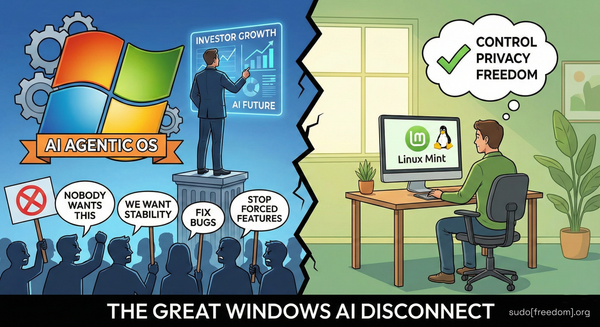
The good news is you have a real choice. You don't have to accept any of Microsoft's bad options.
Stop using Windows entirely.
Your computer isn't obsolete. Windows 10 going end-of-life doesn't mean your hardware stopped working. It means Microsoft stopped supporting their software.
Linux Mint, and specifically LMDE (Linux Mint Debian Edition), runs beautifully on older hardware. That "obsolete" computer that Microsoft says can't run Windows 11 will run LMDE faster, more securely, and with better privacy than Windows 10 ever gave you.
At sudo[freedom].org, we provide step-by-step guides for:
- Installing LMDE on your current hardware
- Migrating your files and workflows from Windows
- Finding Linux alternatives to Windows software
- Setting up encrypted storage that actually respects your privacy
- Escaping the Microsoft ecosystem completely
You don't need to be a system administrator to do this. You don't need to understand every technical detail. You just need to follow clear instructions and be willing to try something different.
The alternative is spending the rest of your digital life renting access to your own computer from Microsoft while they sell your data and serve you ads in the operating system you paid for.
The Bottom Line
Windows 10's end-of-life isn't the problem. Operating systems age out. That's normal.
The problem is how Microsoft is handling it:
- Artificial hardware requirements that force unnecessary upgrades
- Extended support options that all cost money or privacy
- A replacement operating system (Windows 11) that's objectively worse for users
- Complete disregard for e-waste and environmental impact
- Exploitation of a captive user base through OEM monopoly practices
Microsoft isn't giving you choices. They're giving you a ransom note.
Pay up, hand over your data, buy new hardware, or use an unpatched system that will get compromised. Those are your options if you stay in the Windows ecosystem.
Or you can leave.
Your hardware works. Linux is free. Your privacy matters. And at sudo[freedom].org, we'll show you exactly how to make the switch.
Your computer. Your rules. Not Microsoft's.